EasyCommerce integration: Build stunning stores faster
WPBakery has long been your go-to builder for creating flexible WordPress layouts.
In 2026, that flexibility goes even further with its new integration with EasyCommerce. If you are thinking about building an eCommerce store, this integration reduces the effort required to design and customize an existing store.
In this article, we’ll briefly cover what EasyCommerce is, its benefits, how it works with WPBakery, and how you can use this WPBakery Page Builder to build better-looking and faster stores.
Before we dive in, it’s worth mentioning that this WPBakery and EasyCommerce integration didn’t happen overnight. It went through months of building and testing to ensure everything worked smoothly.
What is EasyCommerce?
Let’s start with what EasyCommerce is. It’s an AI-powered WordPress eCommerce plugin designed to help manage an online store directly from the WordPress dashboard.
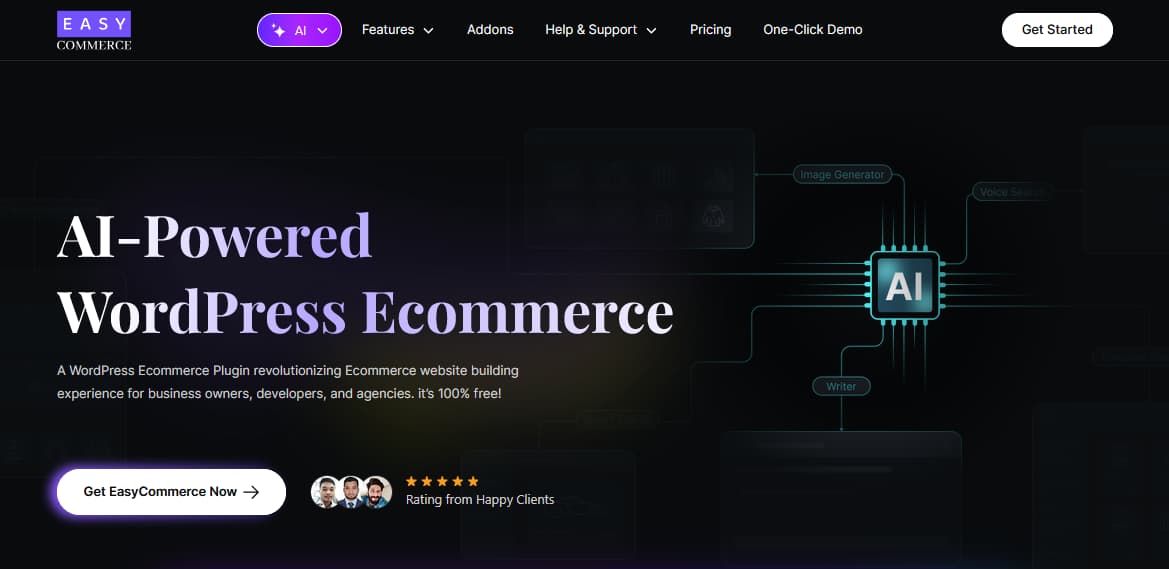
You can sell physical products, digital products, licensed items, or subscriptions, everything on an easy-to-manage system.
Building an online store on WordPress often involves multiple tools and configuration steps. EasyCommerce aims to reduce some of this complexity by bringing common eCommerce functions into a single plugin.
Where Easycommerce fits in the WordPress ecommerce ecosystem?
Everything needs a clear position. So, where does EasyCommerce really stand? What makes it stand out and feel appealing to ecommerce users?
We think there are a few key points worth looking at-
1. Optimized for growing product catalogs
Performance is one of the areas EasyCommerce focuses on, particularly for stores with growing product catalogs. While checking the database, an interesting thing was found.
“On average, when a website takes two extra seconds to load, it can lose about 4% of revenue per visitor.” – Source: Cloudflare
Rather than storing everything in a single table like other platforms, EasyCommerce stores product, order, and customer data in separate, optimized tables.
This data structure can help improve query efficiency, especially for stores managing larger catalogs over time. Your site will load faster, which can result in a smoother shopping experience for customers.
2. Generative AI features
EasyCommerce includes several AI-assisted features designed to support common store tasks. These include tools for generating product descriptions, reviewing store data summaries, creating product images, and improving on-site search.
You also get an AI Image Generator, Image editor, etc., to speed up product visuals and a Smart Search feature that helps customers find products instantly, even if you make a spelling mistake. Together, these features aim to support store management and the customer browsing experience.
These features are intended to reduce manual effort rather than replace existing workflows, particularly for store owners managing content-heavy catalogs. There are some other features, like Voice Search & Product Recommendation, in their pipeline.
3. Intuitive product listing and management
Product listing is a major task for an eCommerce store owner. With the help of an AI (Copy Writer, Image and Attribute Generator), it becomes easier to create and manage products in EasyCommerce.
EasyCommerce features are intended to make product management smoother as the number of products and variations increases. You can create variations and attributes right from the same screen, without jumping between different pages.
Keeping these options on a single screen will help reduce context switching during product setup.
4. EasyCommerce integrations and add-ons
EasyCommerce supports integrations and add-ons that extend its functionality within WordPress. These cover common needs such as payment processing, marketing tools, store migration, and layout customization.
Most integrations are available at no additional cost, while a few, such as License, Subscriptions, etc., are offered as paid add-ons depending on store requirements.
Here’s a quick look at what EasyCommerce integrations and add-ons make possible:
| Category | Examples | Benefit Snapshot |
|---|---|---|
| Payment Gateways | Stripe, PayPal, Mollie, Braintree, more | Accept global payments with quick and easy setup |
| CRM & Marketing Tools | HubSpot, Klaviyo, Mailchimp | Sync customer data and automate marketing campaigns |
| UX & Sales Enhancers | Wishlist, Product Recommendations | Increase engagement and boost average order value |
| Builder & Operations | WPBakery, Gutenberg, PDF Invoice, Checkout Editor | Better workflows and improved customer experience |
| Migration & Setup Help | WooCommerce, SureCart Migration | Smooth migration with minimal downtime |
5. Built-in shipping and tax calculation
Shipping and taxes can easily become confusing, but EasyCommerce centralizes shipping and tax configuration. You can set shipping rates based on zones, weight, or product type, and EasyCommerce automatically calculates the correct shipping cost based on location and product rules.
You stay in control of the setup, while the system takes care of the calculations in the background.
When it comes to taxes, EasyCommerce lets you configure basic tax rules right away. Automated tax calculation is already available for parts of North (US, Canada) and South America (Brazil), with support for more countries planned in future updates.
To start an eCommerce, EasyCommerce also provides built-in features like cart abandonment recovery, personalized emails for customers, and shop and checkout templates. The core plugin is available for free, with optional paid features.
EasyCommerce vs. Other WordPress ecommerce plugins (quick comparison)
To make the differences clearer at a glance, we have provided a short comparison between EasyCommerce, WooCommerce, and SureCart. Let’s see how these three platforms stack up in terms of setup, performance, customization, and overall store management.
| Feature | EasyCommerce | WooCommerce | SureCart |
|---|---|---|---|
| Type | WordPress ecommerce plugin | WordPress ecommerce plugin | Plugin with SaaS-connected backend |
| Setup | Familiar | Familiar | Not Familiar |
| Performance | Fast (custom tables, API-first) | Slower as the store grows (shared WP tables) | API-based, depends on external servers |
| Built-In Features | Many essentials included (shipping, taxes, cart recovery) | Needs plugins for advanced features | Strong checkout & subscriptions focus |
| Customization | New integrations available | Very flexible with many themes/builders | Customizable but limited |
| Data Ownership | Stored in WordPress DB (separate) | Stored in WordPress DB (combined) | Stored on SureCart’s servers |
| Pricing Model | Free & $99.99/yearly | Free core + paid extensions | $179/yearly |
What EasyCommerce Elements you can customize in WPBakery page builder
Now that you have a clear idea of what EasyCommerce is, it’s time to look at how it works with WPBakery.
WPBakery is known for its visual editing experience and flexibility inside WordPress. With the recent EasyCommerce and WPBakery integration, you can now customize key EasyCommerce elements directly inside the builder. Below are the EasyCommerce components you can design and control using WPBakery.
- Shop
- Single Product Page
- Checkout
How to customize your EasyCommerce store with WPBakery
EasyCommerce’s new integration with WPbakery simplifies the customization process. With this, designing your store becomes fully visual and flexible, allowing greater control over page layouts. Here are the steps to start–
Step 1: install required plugins
From the start, you need to install some plugins in your WordPress site. So, here is the list of required plugins:
- EasyCommerce Plugin
- EasyCommerce WPBakery Integration Addon
- WPBakery Page Builder Plugin
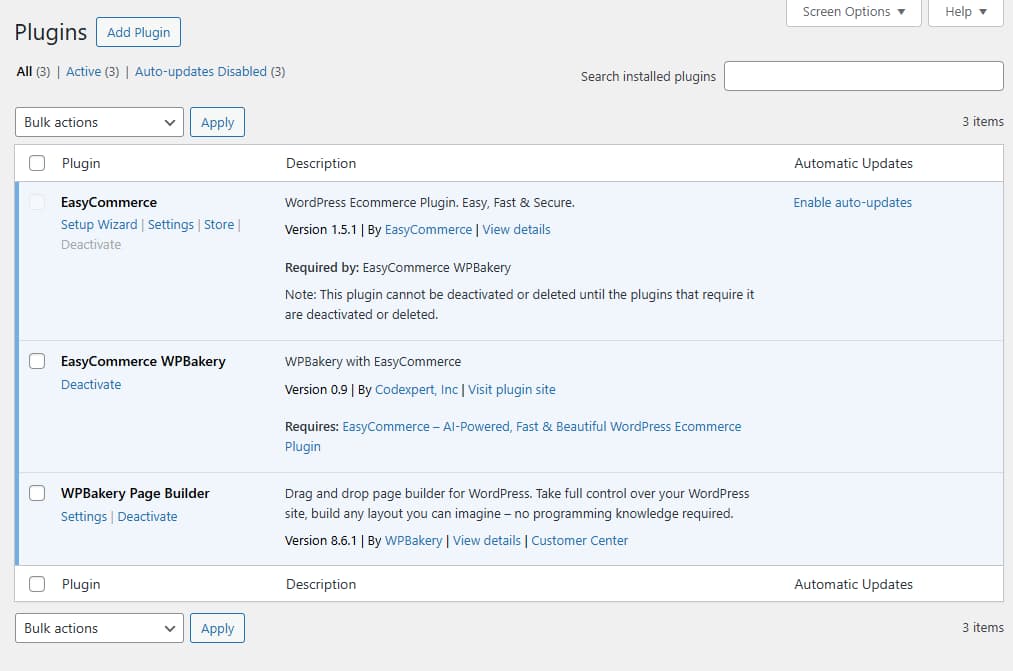
To enjoy every feature mentioned above of EasyCommerce, you have to purchase WPBakery Page Builder to make the eCommerce site creation smoother.
Note: Make sure the WPBakery license is activated. Otherwise, these features won’t work.
Step 2: turn on editor feature from WPBakery
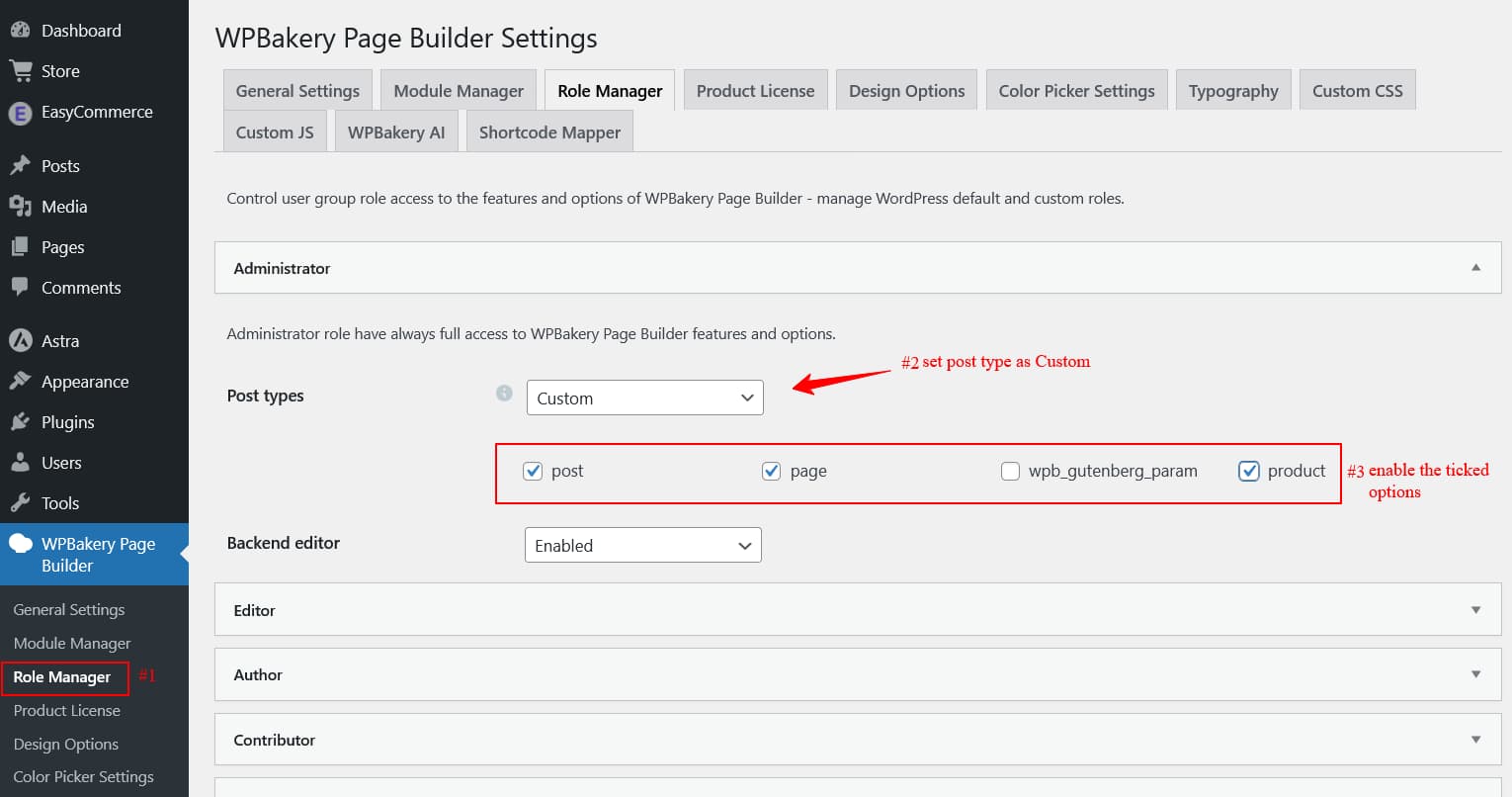
To begin customization, you need to enable WPBakery editing for relevant content types.
From your WordPress menu, go to WPBakery > Role Manager.
Select Custom from the dropdown, then check the boxes for Product, Page, and Post. Click Save Changes.
Step 3: create new pages
You can customize existing pages, but we recommend creating new pages for your Shop and Checkout. This gives you more control and helps keep layouts clean.
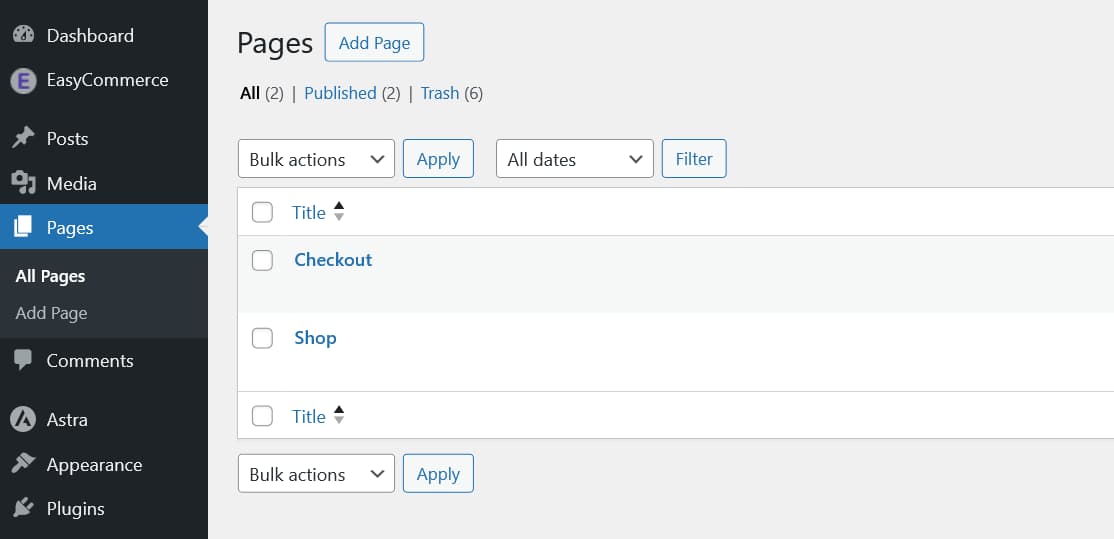
💡 Reminder: If you choose to edit an existing page, remove any old shortcodes first to avoid layout conflicts.
Step 4: customize pages with WPBakery
Once your pages are ready, it’s time to customize them using WPBakery. Starting with the Shop page.
1. Shop page customization
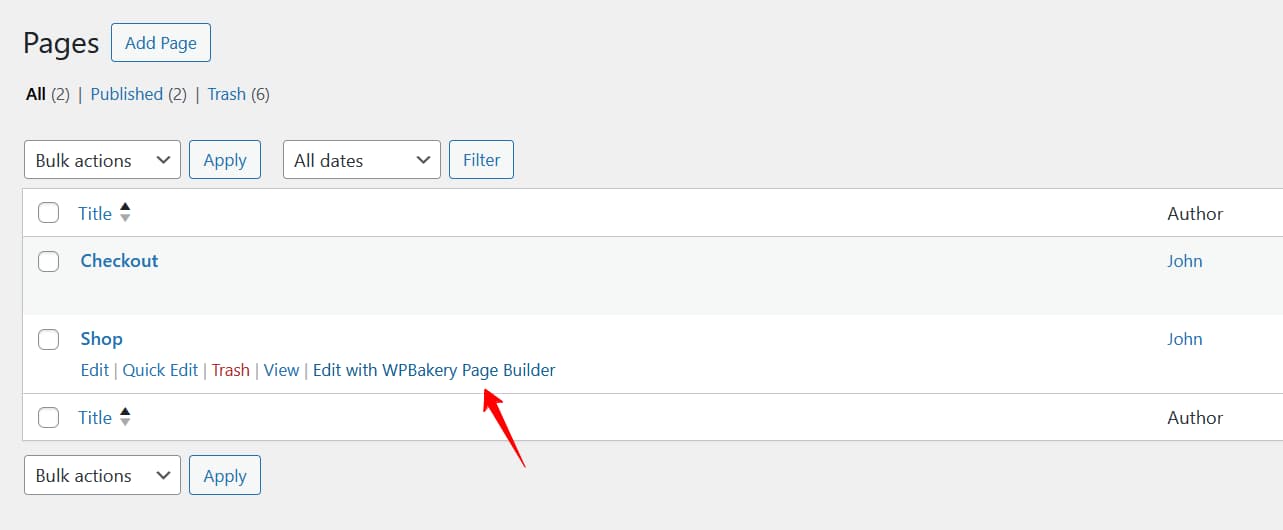
To customize the Shop page, go to Pages in your WordPress dashboard. Hover over your Shop page and click Edit with WPBakery Page Builder.
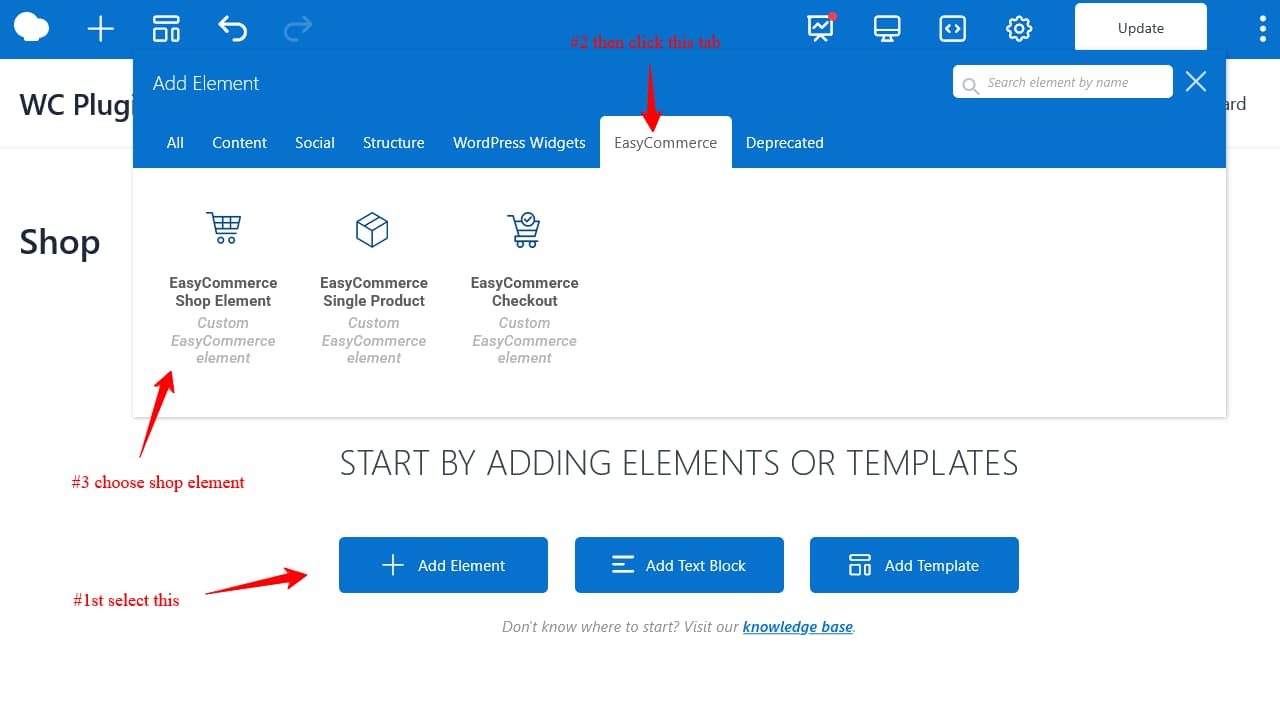
In the editor, click Add Element and choose the EasyCommerce Shop element.
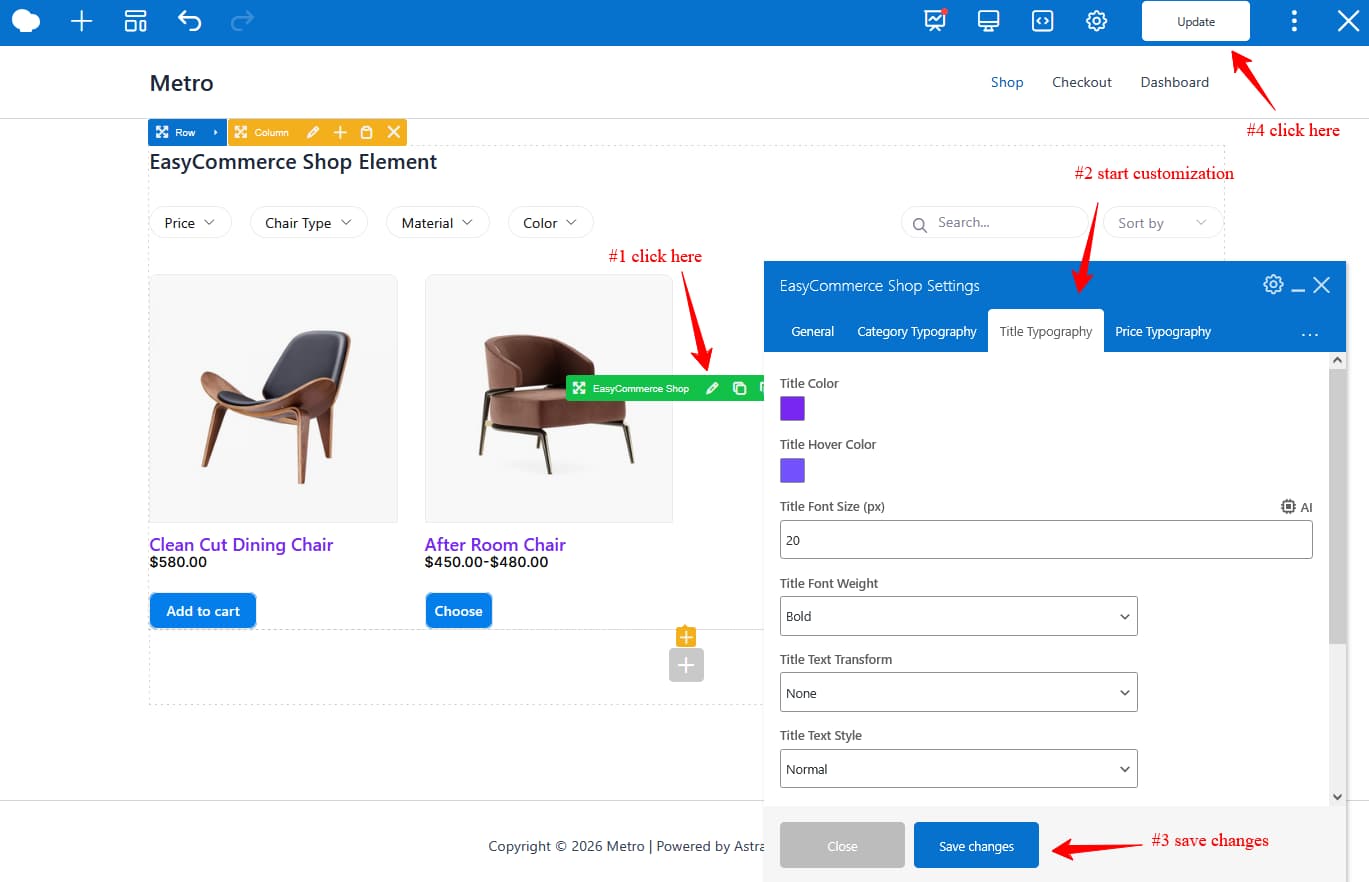
Here, you can customize the number of products per page, show or hide filters, typography for categories, titles, prices, and more.
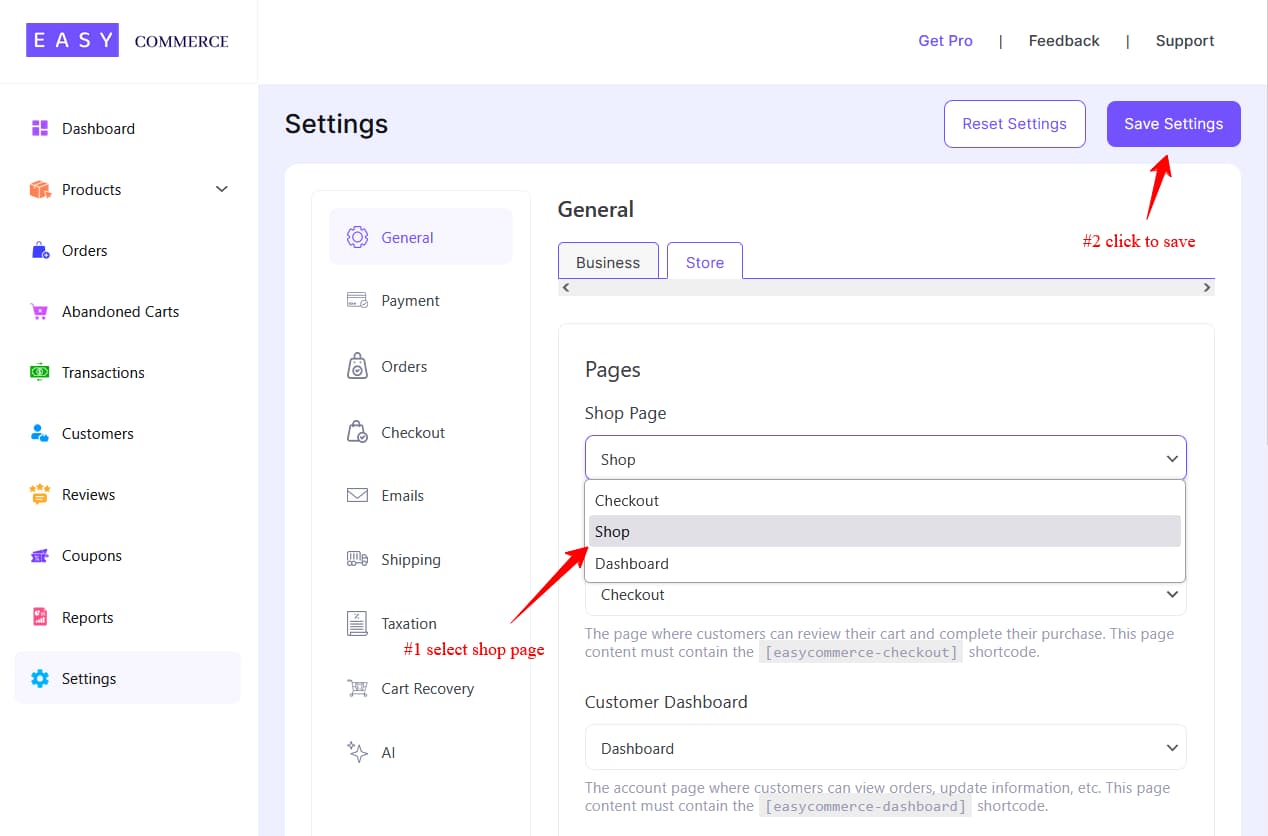
Once you’re happy with the design, set it as your Shop page’s default. Go to EasyCommerce > Settings > General > Store and select your new Shop page.
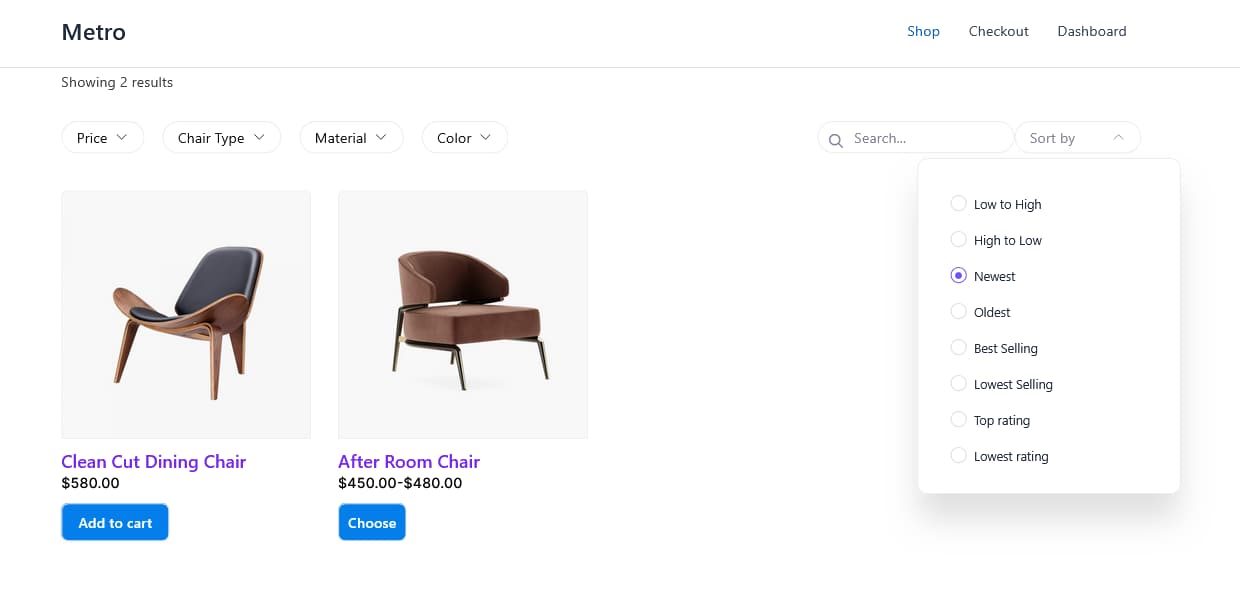
This is what the final output will look like after you design your shop using the WPBakery.
2. Design single product page layout
Next, customize the single product page. Go to the single product page from EasyCommerce Shop and click Edit with WPBakery Page Builder.
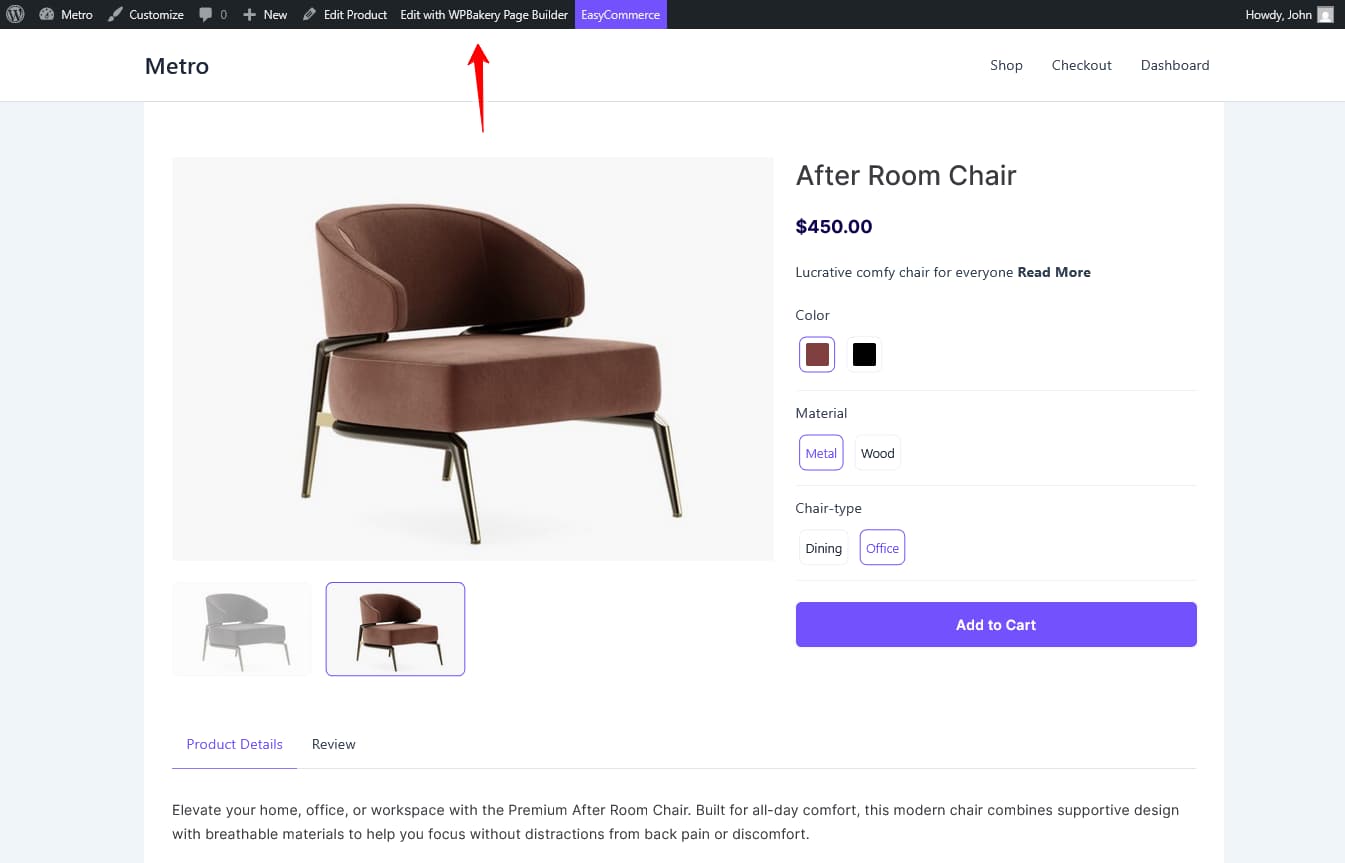
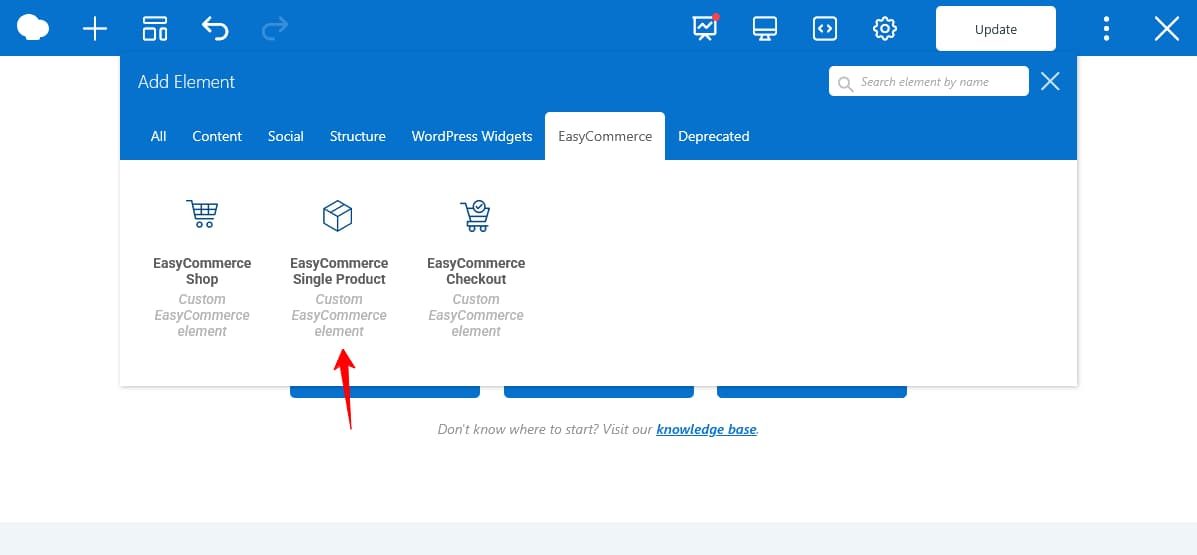
You need to choose the EasyCommerce Single product Element from the WPBakery Add Element Section. Just like you added for the Shop element.
After adding the single product element, you can customize the number of gallery images and show or hide stock information. Not only can you change the gallery or stock, but you can also change typography, title color, font, Add to Cart button section, etc.
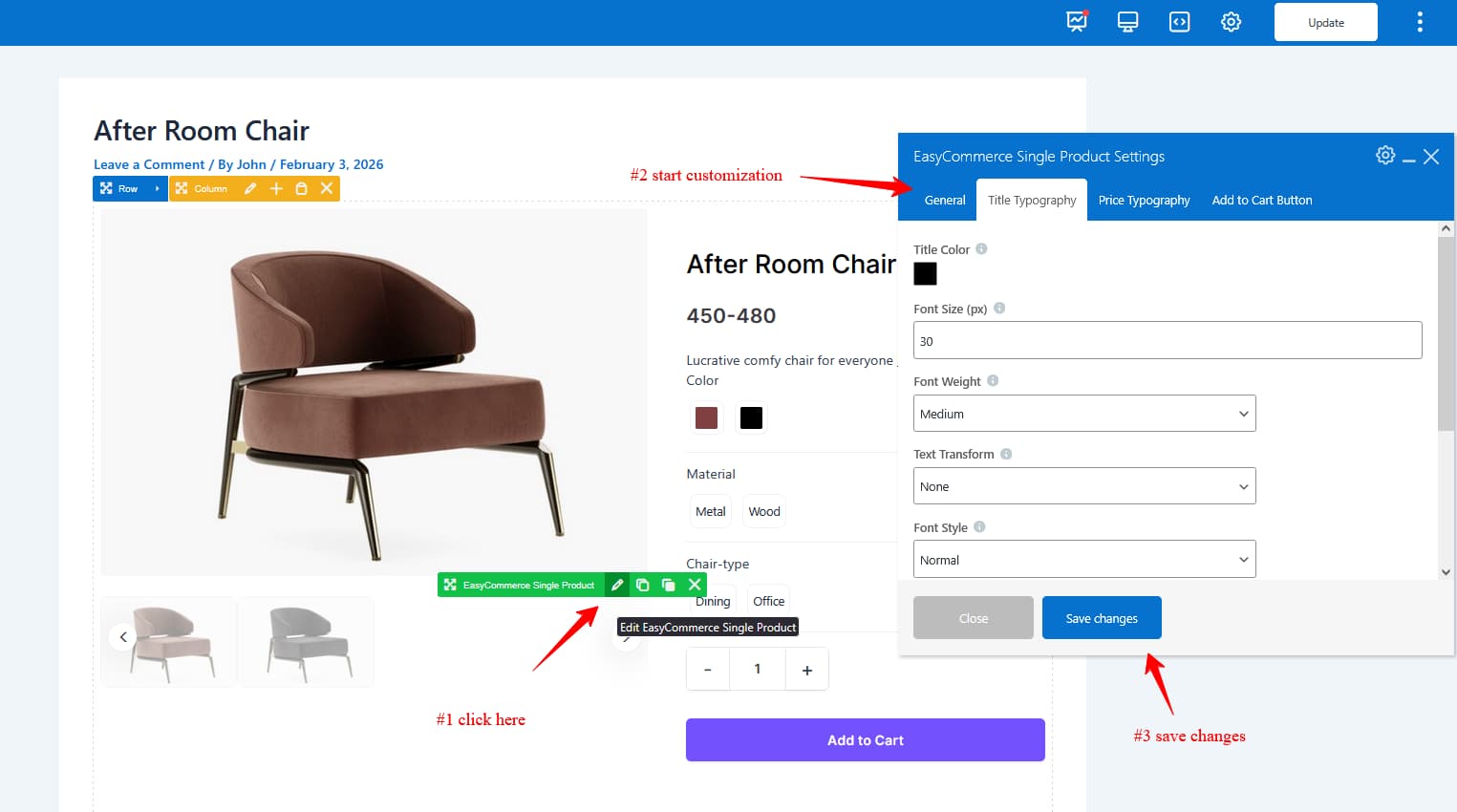
After finishing your changes, simply save the page.
Note: Always use the default WPBakery template for the best customization experience.
3. Improve checkout page layout
Customizing the Checkout page follows a similar process:
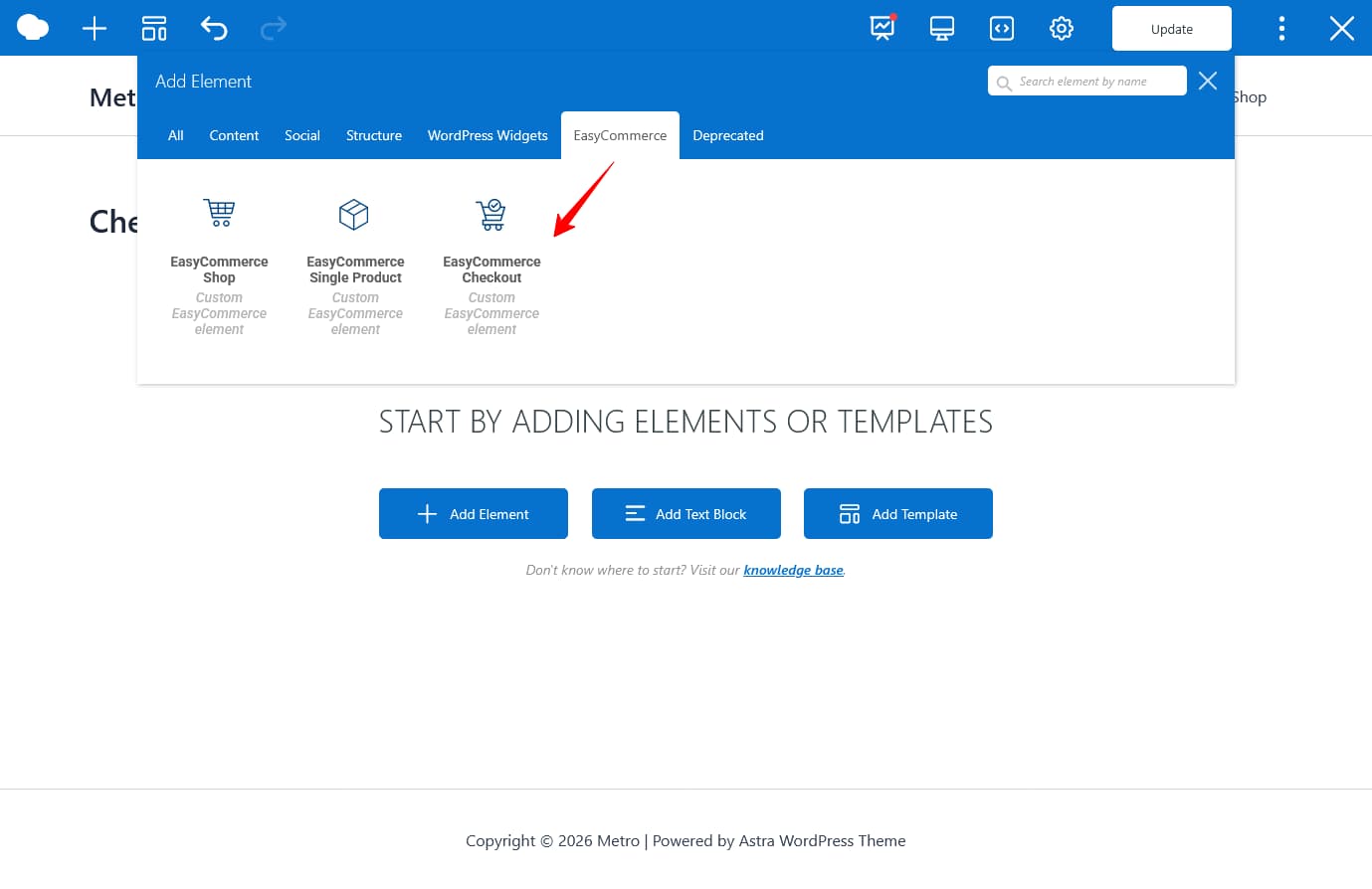
Open the Checkout page with WPBakery Page Builder using the default layout. Click Add Element and select the EasyCommerce Checkout element.
From the editor, you can customize the layout, sections, buttons, and overall styling to match your store.
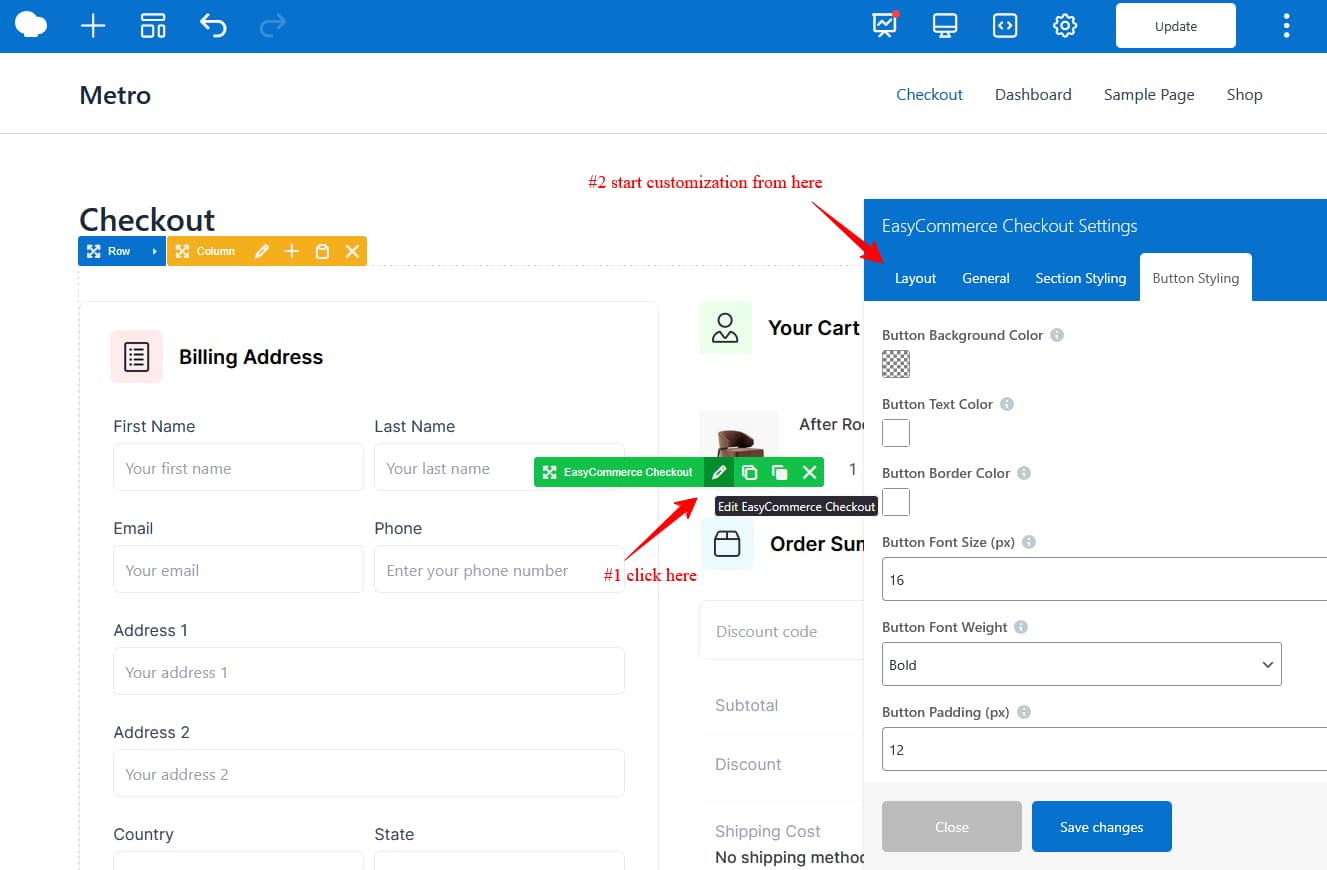
Once you’re done, save your changes and set this page as your default checkout page to make it live. When all the changes are done, click on the Update button.
From the eCommerce perspective, there are tons of ways to customize and improve the look of your store. We believe this is the beginning of EasyCommerce and WPBakery customization. In the future, there will be more to come.
Final thoughts
The WPBakery Page Builder integration with EasyCommerce adds another option for store owners who prefer visual layout control within WordPress. Instead of relying entirely on shortcodes or fixed templates, this setup allows greater flexibility when designing shop, product, and checkout pages.
On the other hand, EasyCommerce manages core eCommerce functionality with built-in AI features, performance-focused architecture, and zero platform fees. WPBakery complements that by providing visual layout control for store pages.
Best of all, all WPBakery customers can get EasyCommerce at 20% off in the Customer Center.
Frequently asked questions (FAQs)
1. Does EasyCommerce have a free version?
Yes. EasyCommerce offers a free version that is available in the WordPress plugin repository. Premium features (license, subscription selling) are available through paid plans.
2. How does EasyCommerce work with WPBakery?
The integration is provided through a dedicated WPBakery addon, which allows store owners to customize shop, product, and checkout pages using WPBakery elements.
3. Do I need WooCommerce to use EasyCommerce with WPBakery?
No. You can use EasyCommerce on its own, as it’s designed as a lightweight, AI-powered alternative to WooCommerce. Integration with WPBakery works directly through a dedicated addon.
4. Will this integration work with my existing WordPress theme?
Typically, yes. WPBakery works with most WordPress themes and EasyCommerce elements match your theme’s styling and, for best results, using a well-maintained theme with WPBakery support is recommended.
